Boostingyourperformance
Your hardware, your rules.
SurgeFPS diagnoses bottlenecks, explains every tweak before applying it, and lets you restore stock Windows settings in one click. 100% reversible, lightweight, and bloat-free.
Free forever — no time limits. The optional Pro upgrade adds Auto-Tune, advanced tweaks, the AI Tweaker & automation.
500+
Gamers boosting their FPS with SurgeFPS
100,000+
Steam, Epic, Game Pass & Riot games auto-detected
90+
Safe, reversible OS & system optimizations
100%
Reversible — nothing permanent
Stop guessing. Ask the AI Tweaker.
Tell it your game and what's wrong — stutter, input lag, low FPS. It builds a short, honest plan from real, reversible tweaks and applies it in one click.
Explore the AI Tweaker →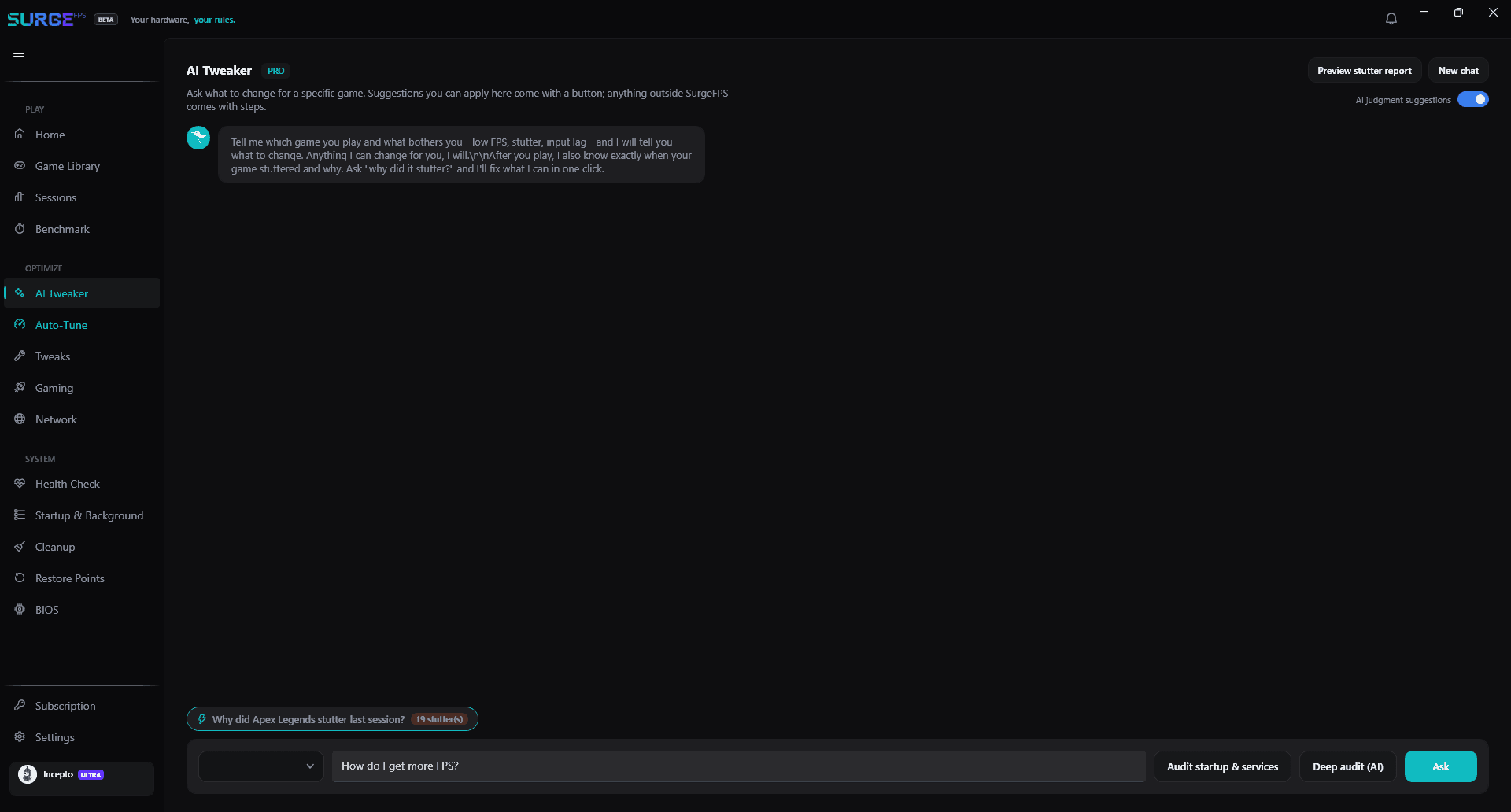
SHOWCASE
Free vs. Pro
Every feature, clearly compared
No surprises behind the paywall — see exactly what stays free forever and what Pro adds.
90+ Manual OS & Performance Tweaks
HAGS, ReBAR, Raw Input, VBS, Core Parking, Network & Telemetry
1-Click System Revert & Restore
Live System & Temp Hardware Monitoring
Manual Game Mode / Quiet Mode / Normal Mode
Temp File Cleanup & RAM Trimming
AI Tweaker & Diagnostic Assistant
1-click fixes for game stutter, GPU settings & FPS drops
Auto-Boost on Launch
Detects game launch, deprioritizes background bloat, sets priority
Smart Thread Routing Engine
Dynamic CPU core pinning & E-core management per game
Automated Game Profiles
Link a profile to any detected game and apply it on launch
One software · one promise
Everything you need to dominate
Every game you play is logged. Open a session to see your framerate over real time — lobbies, loading screens and alt-tabs shaded out — with every stutter marked on the chart and its measured cause, like a Discord CPU spike, a Defender scan or GPU thermal throttling. Then fix them in one click, and undo just as easily.
Ask what to change for the game you actually play — or, after a match, “why did it stutter?” — and get an honest answer built from what SurgeFPS measured, with one-click fix cards you can apply or undo. Every suggestion is a real tweak, service or step SurgeFPS can act on, never an invented one. A Pro feature.
Capture a baseline, apply your tweaks, and capture again — real frame times from the actual game, not a synthetic score. Average, 1% low, and 0.1% low FPS, before and after.
Your whole system at a glance — live CPU, GPU, RAM and temperatures. One-click modes handle the rest: Game Mode sets a High-Performance power plan and a 0.5 ms timer, and closes background bloat.
Everything SurgeFPS does for you while you play, in one place: Auto-Pilot Game Mode (Pro), a free on-screen FPS counter, your preferred GPU, and the stutter fixes you've applied from session reports — each with an Undo.
Loved by gamers
Don't just take our word for it
Real players, real gains. See what the community is saying — or leave a review of your own.
Reviewed onTrustpilotWrite a reviewWindows Gaming Guides
Free, practical guides to squeeze more FPS and lower latency out of Windows.
How to Increase FPS in Fortnite on PC (2026 Settings Guide)
The Fortnite settings that actually raise FPS — Performance mode, the DirectX 12 options to turn off, NVIDIA Reflex — plus the Windows tweaks that stop stutter. Safe and reversible.
Read guide →How to Fix Valorant Stutter and FPS Drops (2026)
Why Valorant stutters even on good PCs, the best Valorant graphics settings for FPS, and the Windows fixes that steady your frame rate. No Vanguard-breaking hacks.
Read guide →How to Increase FPS in CS2 (Best Settings 2026)
The CS2 video settings that raise FPS without hurting visibility, which old CS:GO launch options you can drop, and the Windows tweaks that fix CS2 stutter.
Read guide →How to Increase FPS in Minecraft (Java & Bedrock, 2026)
Get more FPS in Minecraft — the video settings that matter, the Sodium mod for Java, how much RAM to allocate, and forcing Minecraft onto your real GPU.
Read guide →Frequently Asked Questions
What does SurgeFPS do?+
SurgeFPS is a Windows optimization app for gamers. It applies 90+ safe, reversible OS & system optimizations — HAGS, ReBAR, raw input, VBS, core parking, network and telemetry controls — offers one-click system modes (like Game Mode), auto-detects your game library, and monitors CPU/GPU temps and latency in real time — all aimed at higher FPS and lower input latency.
Does SurgeFPS actually increase FPS and reduce input lag?+
SurgeFPS applies well-understood Windows and hardware tweaks — high-performance power plans, a 0.5 ms timer resolution, disabled telemetry and background bloat, GPU scheduling and network stack tuning — that reduce latency and smooth frame times. Real-world gains depend on your hardware, games, and how un-optimized Windows was to begin with. Every change explains its expected impact.
Is SurgeFPS safe? Can I undo the changes?+
Yes. Every change SurgeFPS makes is captured and reversible, so you can undo anything at any time. You can also have SurgeFPS create a real Windows System Restore Point before applying tweaks, giving you a full system-level rollback if you ever need it.
Is SurgeFPS free?+
SurgeFPS is free to download and install, with a free tier that unlocks basic tweaks. Pro and Ultra subscriptions unlock the full set of optimizations and advanced features. See the pricing page for details.
What are the system requirements?+
SurgeFPS runs on Windows 10 or Windows 11 (64-bit), needs about 150 MB of disk space, and requires administrator rights to apply system tweaks.
Which game launchers does SurgeFPS support?+
SurgeFPS auto-detects games from Steam, Epic Games, Xbox Game Pass, Riot, Ubisoft, EA, and Blizzard and lets you edit per-game configuration and launch arguments from one place.